Mobile PDF office: scan, edit, convert and manage documents
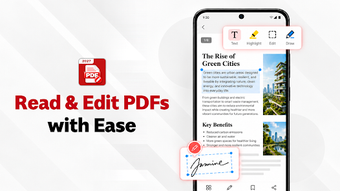
Scans, edits, views and converts PDFs on Android using an integrated camera scanner, editor, viewer and file converter. PDF Editor Super: PDF Reader, published by Mr Jeff Johnson, targets students and business professionals who need mobile document handling. Key capabilities include offline operation, page merge/split tools, password protection and image-to-PDF conversion. The app suits people who must capture paper, adjust content, and export standard office formats without leaving their phone or tablet.
How well does it handle on-device document capture and digitization?
The scanner captures pages with automatic edge detection and converts them into PDF using the device camera, according to the feature list. The app offers automatic cropping and produces multi-page PDFs from consecutive shots, which supports workflows that require turning receipts, forms, or notes into single documents while staying offline.
Can you edit and annotate existing PDFs effectively on mobile?
The editor supports text additions, highlights, and annotations, letting users modify content in situ. It also includes search to find text inside PDFs and a password-protection option for document security. Those capabilities fit users who need to mark up contracts or study materials directly on a handheld device.
Does it integrate with office formats and manage files for business use?
The converter handles Word, Excel, and image-to-PDF transitions and the management tools let you merge, split, rotate, and rename files. That combination lets a mobile worker assemble deliverables and exchange documents in common office formats, while keeping everything accessible on both phones and tablets.
Who should rely on this app for mobile document workflows?
PDF Editor Super suits students and on-the-go professionals who need camera scanning, in-place editing, and format conversion on Android devices. The app supports offline use and common office exchanges, so it helps when desktop access is unavailable; users who require advanced desktop-only PDF features should expect limits compared with full desktop editors.